Since my last release of the MVC toolkit some major changes have taken place in the MVC Framework. I am going to do a quick run through of how they changed the MVC CAPTCHA for the better.
Originally in MVC Preview Release 1 for the MVC CAPTCHA many of you remember that the indicator for a valid CAPTCHA was passed through the parameters of the action method like so:
[ControllerAction]
[CaptchaValidation("captcha")]
public void Register(bool captchaValid, string otherParameters)
{
    // do stuff
}
However when Preview Release 2 came out the ability to pass the parameter through the action method was broken. So I had to create a hack around this:
[CaptchaValidation("captcha")]
public void Register(string otherParameters)
{
    bool captchaValid = (bool)RouteData.Values["captchaValid"];
    // do stuff
}
Apparently without realizing it in Preview Release 1, I had discovered a major feature that everybody that I explained it to saw great potential in. So I submitted a feature request and waited for the ASP.NET Team to get back to me. With the release of Preview Release 3, they finally answered my prayers and added the parameter injection feature back in to the framework.
So now this code works again in the Preview Release 3 version of the MVC CAPTCHA control.
[CaptchaValidation("captcha")]
public void Register(bool captchaValid, string otherParameters)
{
    // do stuff
}
This works because of a new property called ActionParameterson the ActionExecutingContext. It can be used to test and change any of the action methods parameters before the action method has been executed. For the purpose of the MVC CAPTCHA control it allows me to inject a true or false value in to a parameter called captchaValid, so that the action method knows that the CAPTCHA validation passed or failed.
public override void OnActionExecuting(ActionExecutingContext filterContext)
{
    // make sure no values are getting sent in from the outside
    if (filterContext.ActionParameters.ContainsKey("captchaValid"))
        filterContext.ActionParameters["captchaValid"] = null;

    // get the guid from the post back
    string guid = filterContext.HttpContext.Request.Form["captcha-guid"];

    // check for the guid because it is required from the rest of the opperation
    if (String.IsNullOrEmpty(guid))
    {
        filterContext.RouteData.Values.Add("captchaValid", false);
        return;
    }

    // get values
    CaptchaImage image = CaptchaImage.GetCachedCaptcha(guid);
    string actualValue = filterContext.HttpContext.Request.Form[Field];
    string expectedValue = image == null ? String.Empty : image.Text;

    // removes the captch from cache so it cannot be used again
    filterContext.HttpContext.Cache.Remove(guid);

    // validate the captch
    filterContext.ActionParameters["captchaValid"] =
        !String.IsNullOrEmpty(actualValue)
        && !String.IsNullOrEmpty(expectedValue)
        && String.Equals(actualValue, expectedValue, StringComparison.OrdinalIgnoreCase);
}
Notice in the code above all the filterContext.ActionParameters references, that is the CAPTCHA validation checking for the parameter in the method parameters list and adding the value of the CATPCHA validation to the list. Note that in order for this to work you must already have the captchaValid attribute present in your method, these actions merely fill in the value of the captchaValid placeholder.
For anybody who hasn't used my MVC CAPTCHA control before, you only need to do two things:
1. You need to register the CAPTCHA image handler.
<httpHandlers>
    <add verb="GET" path="captcha.ashx" validate="false" type="ManagedFusion.Web.Handlers.CaptchaImageHandler, ManagedFusion" />
</httpHandlers>
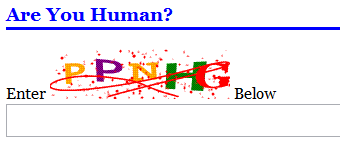
2. Add the following to the View that you want the CAPTCHA to show in. Note the extension, CaptchaTextBox in HtmlHelper, generates a text box with autocomplete="off" so that the CAPTCHA box will not have an auto-complete show up.
<label for="captcha">Enter <%= Html.CaptchaImage(50, 180) %> Below</label><br />
<%= Html.CaptchaTextBox("captcha") %>
Which generates the following.
If you would like to download the latest copy of the MVC CAPTCHA it is available in my MVC Toolkit.
Download: Coder Journal MVC Toolkit
Source: Coder Journal MVC Toolkit