ASP.NET MVC CAPTCHA
Note: Most recent update for MVC Release Candidate 3 is out.
So my MVC application that I have been working on required a CAPTCHA today. The problem is that all of the solutions out there, that I could find for ASP.NET, are control based and I wanted a more MVC approach. I know I could have easily implemented one of them using the Html.RenderControl(), however I want to use a MVC approach to the CAPTCHA authentication box. So I started out with Jeff Atwood’s CAPTCHA Control made for ASP.NET 2.0 in VB.NET 2005. I then converted it to C# and modified and expanded on it for the MVC framework. The following is the result of my work.
The following creates the CAPTCHA image on the page, that looks like the image below the code:
<label for="captcha">Enter <%= Html.CaptchaImage(50, 180) %> Below</label><br />
<%= Html.TextBox("captcha") %>
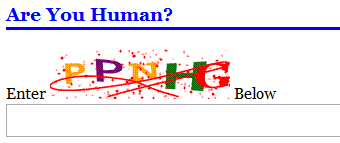
The following is how the CAPTCHA is validated:
[ControllerAction]
[CaptchaValidation("captcha")]
public void Register(string userName, string password, string email, string question, string answer, bool captchaValid)
{
// do stuff
}
The input in the CaptchaValidationAttribute is the name of the form field that you want to check against the CAPTCHA. Also notice the last parameter of the method called captchaValid this is required, and the value contains information on if the CAPTCHA was validated or not. captchaValid is automatically inserted in to the route data. From there you can go on and redirect the user to another page or do whatever your application would require if the CAPTCHA failed validation.
So as you can see it is relatively simple to use the CAPTCHA validation that I have created to test and verify your input with a CAPTCHA. The setup just requires adding a HttpHandler to the Web.config and the inclusion of a couple files.
<httpHandlers> <add verb="GET" path="captcha.ashx" validate="false" type="ManagedFusion.Web.Handlers.CaptchaImageHandler, ManagedFusion" /> </httpHandlers>
All the work is actually done in the OnPreAction method in the Controller like so:
protected override bool OnPreAction(string actionName, System.Reflection.MethodInfo methodInfo)
{
object[] attributes = methodInfo.GetCustomAttributes(typeof(CaptchaValidationAttribute), false);
if (attributes != null && attributes.Length > 0)
OnCaptchaValidation(actionName, methodInfo, (CaptchaValidationAttribute)attributes[0]);
return base.OnPreAction(actionName, methodInfo);
}
protected virtual bool OnCaptchaValidation(string actionName, System.Reflection.MethodInfo methodInfo, CaptchaValidationAttribute attribute)
{
if (attribute == null)
throw new ArgumentNullException("attribute");
// make sure the captcha valid key is not contained in the route data
if (this.RouteData.Values.ContainsKey("captchaValid"))
this.RouteData.Values.Remove("captchaValid");
// get the guid from the post back
string guid = Request.Form["captcha-guid"];
// check for the guid because it is required from the rest of the opperation
if (String.IsNullOrEmpty(guid))
{
this.RouteData.Values.Add("captchaValid", false);
return true;
}
// get values
CaptchaImage image = CaptchaImage.GetCachedCaptcha(guid);
string actualValue = Request.Form[attribute.Field];
string expectedValue = image == null ? String.Empty : image.Text;
// removes the captch from cache so it cannot be used again
HttpContext.Cache.Remove(guid);
// validate the captch
if (String.IsNullOrEmpty(actualValue) || String.IsNullOrEmpty(expectedValue) || !String.Equals(actualValue, expectedValue, StringComparison.OrdinalIgnoreCase))
{
this.RouteData.Values.Add("captchaValid", false);
return true;
}
this.RouteData.Values.Add("captchaValid", true);
return true;
}
And with the following HtmlHelper:
public static string CaptchaImage(this HtmlHelper helper, int height, int width)
{
CaptchaImage image = new CaptchaImage {
Height = height,
Width = width,
};
HttpRuntime.Cache.Add(
image.UniqueId,
image,
null,
DateTime.Now.AddSeconds(ManagedFusion.Web.Controls.CaptchaImage.CacheTimeOut),
Cache.NoSlidingExpiration,
CacheItemPriority.NotRemovable,
null);
StringBuilder stringBuilder = new StringBuilder(256);
stringBuilder.Append("<input type=\"hidden\" name=\"captcha-guid\" value=\"");
stringBuilder.Append(image.UniqueId);
stringBuilder.Append("\" />");
stringBuilder.AppendLine();
stringBuilder.Append("<img src=\"");
stringBuilder.Append("/captcha.ashx?guid=" + image.UniqueId);
stringBuilder.Append("\" alt=\"CAPTCHA\" width=\"");
stringBuilder.Append(width);
stringBuilder.Append("\" height=\"");
stringBuilder.Append(height);
stringBuilder.Append("\" />");
return stringBuilder.ToString();
}
The rest of the source can be downloaded, if you are interested:
I have tested this to work with in the guidelines that I need, which are pretty broad. However if you find a circumstance where this won’t work please let me know and I would be happy to integrate it in to this code.
Update (2008-3-9): The latest refresh of my ASP.NET MVC CAPTCHA control for Preview 2 of the MVC framework using ActionFilterAttribute.


March 3rd, 2008 at 12:36 pm
ASP.NET MVC CAPTCHA
You’ve been kicked (a good thing) – Trackback from DotNetKicks.com
March 3rd, 2008 at 1:43 pm
Cool work! Only thing is when i try to download the code it gives a ‘This file type cannot be served’ for .cs files. Good job though
March 3rd, 2008 at 2:18 pm
Okay, I provided a zipped source file. I guess I should have assumed that IIS wasn’t going to serve the C# files as just text.
March 7th, 2008 at 10:19 am
ASP.NET MVC Tip # 7 – Using a CAPTCHA with MVC
Problem: You need a CAPTCHA to use when submitting forms in MVC Solution: For this I will defer to an
March 7th, 2008 at 10:19 am
Excellent article! I was looking for something like this for a while.
March 8th, 2008 at 1:22 pm
[...] ASP.NET MVC CAPTCHA – Nick Berardi’s Coder Journal So my MVC application that I have been working on required a CAPTCHA today. (tags: http://www.coderjournal.com 2008 mes2 dia8 at_home CAPTCHA ASP.NET MVC blog_post article ***) [...]
March 9th, 2008 at 12:33 pm
[...] last article on ASP.NET MVC CAPTCHA was very well received by many of my readers and it even caught the eye of the DotNetKicks crowd. [...]
March 16th, 2008 at 12:04 pm
3ks very much…
April 24th, 2008 at 10:14 am
47 ASP.NET MVC Resources to Rock Your Development…
Craig Shoemaker takes you on a tour of the best ASP.NET MVC resources available today. Listen to the…
June 2nd, 2008 at 12:40 pm
Great work on this! Trying to understand your license…can I use this on a public website?
June 3rd, 2008 at 5:39 am
The license is Attribution-Share Alike 3.0, which means you can copy, distribute and make derivative works. But you must reference me in the comment at the top of any of these files that you are downloading. I don’t require a link back from your website, but it is always nice.
Also the New BSD License used on the Google Code site is the least restrictive one that I could find. Basically use my code how you want, just give me a reference in it.
June 8th, 2008 at 11:17 pm
i am using captcha in mvc as per ur steps….
how to add captcha.ashx in mvc project?
plz help!!!!!
June 9th, 2008 at 6:32 am
Craig, See the second code block with the XML in it. Add this to your web.config file.
June 10th, 2008 at 1:45 am
Thanks for ur reply…..
Yes,I added the code block in my web.config file.but it is not working…..
actually problem is that captcha image is not displaying on page.It is not giving me any error.
plz help!!!!!!!!!
June 10th, 2008 at 5:44 am
What is the error. A quick way to find out is to take the image url that is generated and paste it in to your browser.
June 18th, 2008 at 2:01 pm
[...] to Nick Berardi for his nicely done Captcha control for ASP.NET MVC [...]
June 20th, 2008 at 7:55 am
Hi
Is this updated to MVC Release 3 or ?
Would appreciate it if you could!?
Thanks!
Andy
June 21st, 2008 at 8:55 am
Hi Andy,
I haven’t done a post on it yet. But you can find the updated CAPTCHA here:
http://code.google.com/p/coderjournal/source/browse/trunk/ManagedFusion/Source/Web/Mvc/CaptchaValidationAttribute.cs
This new CAPTCHA works how I originally intended by passing the captchaValid through the parameters of the Action method.
Try it out.
Nick
June 24th, 2008 at 7:12 am
[...] in MVC Preview Release 1 for the MVC CAPTCHA many of you remember that the indicator for a valid CAPTCHA was passed through the parameters of [...]
July 2nd, 2008 at 11:01 am
Great code! With this and the snippets i pulled from aspunity.com I will be able to finish my projects. Thanks!!!
August 11th, 2008 at 6:49 am
Nice and Helpful. Thanks
November 21st, 2008 at 5:32 am
Hi…nick
I am working on Refreshing Captcha Image on clickiing “Try Differant Image” link.
On page load captcha renders very well.But I want to refresh captch if its not cleary visible
for that i am using ajax form to avoid postback
captcha image div is :-
I want to refresh captcha image only.
this is action method contains code…..(same as ProcessRequest() in CaptchaImageHandler)
public void RefreshCaptcha(HttpContext context)
{
string guid = context.HttpContext.Request.QueryString["guid"];
//remaining code…….
}
But here HttpContext remains null.
Is there anything missing…..
Any Help or suggestion……
Thanks in advance…..
June 30th, 2009 at 3:55 pm
I want this work. Please give me this work
July 9th, 2009 at 5:13 am
I downloaded your source. now i will try
July 9th, 2009 at 1:21 pm
Hi Nick,
I’m having trouble with the Captcha image on the web farm. I get inconsistent 404 errors randomly from each server. when I test it on each server it works just fine.
Any suggestions?
Thanks!
Ehsan
July 29th, 2009 at 8:48 am
Ehsan,
The reason it will not work properly on a web farm is that he is storing the captcha answer in the Cache, which is local to each server. You would need to modify the source to save the image to the Session or some other shared memory. Alternatively, you could set the load balancing to have an affinity to a particular server, though this would break if the server they were on left the cluster between requests.
Robert
August 17th, 2009 at 9:55 am
Great!
Thanks for the hints!
October 21st, 2009 at 10:06 am
It is really great and easy component. My problem is that it is working ok at localhost, but when I publish web site which is in the subsite example: http://www.aut.com/online/…, it is not working. It wont show the image. Server where I host site is in different time zone and I think it has something with CacheTimeOut or something else. Do you have any idea what could it be?
October 22nd, 2009 at 3:36 am
I have solved the problem. This is very important if you host site in IIS 7.
Somehow, server won’t add Captcha handler mapping from web.config file. You must add it manualy! I spent hours and hours to resolve it.
Just go to IIS7, select site, choose ‘Handler Mappings ‘, and manualy add new handler mapping. In first box type ‘captcha.ashx’, second ‘MVCHelpers.CaptchaImageHandler, MVCHelpers’, third ‘Captcha’, and OK.
That’s it.
Once again, thanks for this beautifull real MVC component.
November 9th, 2009 at 9:51 pm
I’m trying to implement these routines in VB and I’m finding that the OnPreAction override does not exist, instead it is OnActionExecuting and is a Sub not a Function. Is this solution current?
January 21st, 2010 at 3:08 am
I just want to answer the catpcha.ashx questions :
simply create a file named “captcha.ashx” and add this line as only line of code.
Great work Nick tho !