ASP.NET MVC Preview 2 CAPTCHA using ActionFilterAttribute
My last article on ASP.NET MVC CAPTCHA was very well received by many of my readers and it even caught the eye of the DotNetKicks crowd. Now that MVC Preview 2 was released last week, many new features make encapsulating my CAPTCHA control even easier. Most notably is the ActionFilterAttribute which allows you to override the Pre and Post action events for any action the attribute is applied to.
Basically everything works the same as it did in the previous article. I just modified things for MVC Preview 2. To validate the CAPTCHA you add the attribute CaptchaValidation to the action.
[CaptchaValidation("captcha")]
public void Register(string userName, string password, string email, string question, string answer, bool captchaValid){
// do stuff
}
You still need to register the CAPTCHA image handler.
<httpHandlers>
<add verb="GET" path="captcha.ashx" validate="false" type="ManagedFusion.Web.Handlers.CaptchaImageHandler, ManagedFusion" />
</httpHandlers>
I added an extension to HtmlHelper that generates a text box with autocomplete=”off”.
<label for="captcha">Enter <%= Html.CaptchaImage(50, 180) %> Below</label><br />
<%= Html.CaptchaTextBox("captcha") %>
Which generates the following.
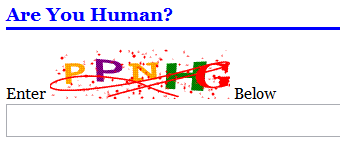
You can view the source code for this on my Google Code Project, everything is available through SVN.
Or you can download the project for you own personal use.
Tags: ASP.NET, C#, CAPTCHA, Microsoft, MVC
Social: |
| View blog reactions

Subscribe via Email
March 9th, 2008 at 12:35 pm
ASP.NET MVC Preview 2 CAPTCHA using ActionFilterAttribute
You’ve been kicked (a good thing) - Trackback from DotNetKicks.com
March 9th, 2008 at 12:37 pm
[...] (2008-3-9): The latest refresh of my ASP.NET MVC CAPTCHA control for Preview 2 of the MVC framework using [...]
March 10th, 2008 at 11:46 pm
Thanks
I tried it but it is not working for me
I am newbie for MVC
It has been nice to get a full solution of the implementation
Ted
April 8th, 2008 at 10:59 am
Hello, seems like nice stuff.
any sample webpage of how to use the code ?
TIA
April 8th, 2008 at 11:51 am
Checkout: http://code.google.com/p/coderjournal/
April 13th, 2008 at 12:05 pm
[...] CaptchaAttribute I did a whole post on providing a CAPTCHA for your MVC action. [...]
May 7th, 2008 at 9:34 pm
Thanks very much for your codes. However, I’ve run into some trouble using it. Would you be able to give it a quick look and see what’s wrong?
This is what i have in the .aspx file:
Login Name:
Enter Below
The codes in controller:
[CaptchaValidation("captcha")]
public void Register(string userName, bool captchaValid)
{
if ( captchaValid)
ViewData["Name"] = userName;
else
ViewData["Name"] = “Invalid”;
RenderView(”About”);
}
}
The error messages seem to suggest that the parameter “captchaValid” is not in the action parameter. I have inserted a breakpoint at the start of the “Register” Action, but the breakpoint is never triggered. I’ve also tried a simple “LogActionFilter” as demonstrated in the ASP .NET MVC video and it worked fine.
I’ve been stuck for days already and run out of ideas on what to do next. Would you be able to see what’s wrong? Thanks very much for your help.
Error Message:
Server Error in ‘/’ Application.
A value is required for parameter ‘captchaValid’ in action ‘Register’. The parameter either has no value or its value could not be converted. To make a parameter optional its type should either be a reference type or a Nullable type.
Description: An unhandled exception occurred during the execution of the current web request. Please review the stack trace for more information about the error and where it originated in the code.
Exception Details: System.InvalidOperationException: A value is required for parameter ‘captchaValid’ in action ‘Register’. The parameter either has no value or its value could not be converted. To make a parameter optional its type should either be a reference type or a Nullable type.
Source Error:
An unhandled exception was generated during the execution of the current web request. Information regarding the origin and location of the exception can be identified using the exception stack trace below.
Stack Trace:
[InvalidOperationException: A value is required for parameter 'captchaValid' in action 'Register'. The parameter either has no value or its value could not be converted. To make a parameter optional its type should either be a reference type or a Nullable type.]
System.Web.Mvc.Controller.InvokeActionMethod(MethodInfo methodInfo, RouteValueDictionary values) +1385
System.Web.Mvc.Controller.InvokeAction(String actionName, RouteValueDictionary values) +538
System.Web.Mvc.Controller.InvokeAction(String actionName) +49
System.Web.Mvc.Controller.Execute(ControllerContext controllerContext) +173
System.Web.Mvc.Controller.System.Web.Mvc.IController.Execute(ControllerContext controllerContext) +28
System.Web.Mvc.MvcHandler.ProcessRequest(HttpContextBase httpContext) +366
System.Web.Mvc.MvcHandler.ProcessRequest(HttpContext httpContext) +55
System.Web.Mvc.MvcHandler.System.Web.IHttpHandler.ProcessRequest(HttpContext httpContext) +28
System.Web.CallHandlerExecutionStep.System.Web.HttpApplication.IExecutionStep.Execute() +358
System.Web.HttpApplication.ExecuteStep(IExecutionStep step, Boolean& completedSynchronously) +64
May 8th, 2008 at 6:26 am
Hi kkl,
In Preview 2 they actually broke the RouteData insertion. I didn’t realize this until after the release of this post. To get the captchaValid parameter, remove it from the method and call it this way in the first line of your action.
bool captchaValid = (bool)RouteData.Values["captchaValid"];
May 16th, 2008 at 1:07 pm
Hi ,
I have done similar CAPTCHA image using MVC Action result.
May 19th, 2008 at 3:02 am
It’s working very smooth now. Thanks. Much appreciated.
May 22nd, 2008 at 5:58 am
Hello, I have tried with the suggested implementation butfound that the captcha couldn’t be shown.
They I try to copy the link from the captcha as follows
http://localhost:1437/Home/captcha.ashx?guid=b344ea4ffc9e4f4bae22870af3a3647d
and try to open it and follow errors occurred.
Server Error in ‘/’ Application.
——————————————————————————–
A public action method named ‘captcha.ashx’ could not be found on the controller.
Description: An unhandled exception occurred during the execution of the current web request. Please review the stack trace for more information about the error and where it originated in the code.
Exception Details: System.InvalidOperationException: A public action method named ‘captcha.ashx’ could not be found on the controller.
Source Error:
An unhandled exception was generated during the execution of the current web request. Information regarding the origin and location of the exception can be identified using the exception stack trace below.
Stack Trace:
[InvalidOperationException: A public action method named 'captcha.ashx' could not be found on the controller.]
System.Web.Mvc.Controller.HandleUnknownAction(String actionName) +133
System.Web.Mvc.Controller.Execute(ControllerContext controllerContext) +219
System.Web.Mvc.Controller.System.Web.Mvc.IController.Execute(ControllerContext controllerContext) +36
System.Web.Mvc.MvcHandler.ProcessRequest(HttpContextBase httpContext) +419
System.Web.Mvc.MvcHandler.ProcessRequest(HttpContext httpContext) +71
System.Web.Mvc.MvcHandler.System.Web.IHttpHandler.ProcessRequest(HttpContext httpContext) +36
System.Web.CallHandlerExecutionStep.System.Web.HttpApplication.IExecutionStep.Execute() +181
System.Web.HttpApplication.ExecuteStep(IExecutionStep step, Boolean& completedSynchronously) +75
Should I config something on the routing or anything I missed? Thanks.
May 22nd, 2008 at 6:02 am
You are using Preview 3 which changed the route handler around. “captcha.ashx” in PR 2 would be handled by the handler, however in PR 3 it is handled as an action. To get around this you need to do the following for your Route:
Constraints = new RouteValueDictionary { { “controller”, “[^\\.]*” }, { “action”, “[^\\.]*” } }
May 22nd, 2008 at 8:42 pm
Thanks but I checked and it is using Preview 2 only. It seems it coudln’t call the ashx.
May 23rd, 2008 at 9:51 pm
I have tried it. But it has a error:
Configuration Error:
Description: An error occurred during the processing of a configuration file required to service this request. Please review the specific error details below and modify your configuration file appropriately.
Parser Error Message: Could not load file or assembly ‘ManagedFusion, Version=1.0.0.0, Culture=neutral’ or one of its dependencies. The system cannot find the file specified.
Source Error:
Line 105:
Line 106:
Line 107:
Line 108:
Source File: D:\MyProject\projects\mvc.psp.gate.vn\mvc.psp.gate.vn\web.config Line: 107
Assembly Load Trace: The following information can be helpful to determine why the assembly ‘ManagedFusion, Version=1.0.0.0, Culture=neutral’ could not be loaded.
=== Pre-bind state information ===
LOG: User = RND-VIETBL\Administrator
LOG: DisplayName = ManagedFusion, Version=1.0.0.0, Culture=neutral
(Partial)
LOG: Appbase = file:///D:/MyProject/projects/mvc.psp.gate.vn/mvc.psp.gate.vn/
LOG: Initial PrivatePath = D:\MyProject\projects\mvc.psp.gate.vn\mvc.psp.gate.vn\bin
Calling assembly : (Unknown).
===
LOG: This bind starts in default load context.
LOG: Using application configuration file: D:\MyProject\projects\mvc.psp.gate.vn\mvc.psp.gate.vn\web.config
LOG: Using machine configuration file from C:\WINDOWS\Microsoft.NET\Framework\v2.0.50727\config\machine.config.
LOG: Policy not being applied to reference at this time (private, custom, partial, or location-based assembly bind).
LOG: The same bind was seen before, and was failed with hr = 0×80070002.
What’s happened? Please help!
Thanks Nick Berardi
May 23rd, 2008 at 9:57 pm
A report error:
add verb=”GET” path=”captcha.ashx” validate=”false” type=”ManagedFusion.Web.Handlers.CaptchaImageHandler, ManagedFusion”
It couldn’t load file or assembly ManagedFusion.
Please help me!
Thanks.
May 25th, 2008 at 4:52 am
Thanks, I found out the problem.
Under Web.Config
It should be ManagedFusion.Web.Mvc.Handlers.CaptchaImageHandler and works fine now. Thanks.
June 11th, 2008 at 11:23 pm
Hello!!!!
I am using MVC preview 3….
In my project I followed all the steps mention above….
but it seems that captcha.ashx is not get called.what changes should be done related to Routing in MVC 3.
plz help!!!!!!!
thanks in advance….
June 12th, 2008 at 5:35 am
Hi Nick.. Nice post.. I have got your CAPTCHA working in my Preview 2. Recently I upgraded to Preview 3. The solution compiles and executes fluently but the CAPTCHA image is not displayed onto the page. What changes do I have to make in the routing scenario for page requests to captcha.ashx …. ?I am getting frustrated… Can you please upgrade your post for Preview 3 please….
Thanks in advance
June 12th, 2008 at 8:05 am
Hi Peter,
Add this to your Constraints:
Constraints = new RouteValueDictionary { { “action”, “[^\\.]*” } }
This will tell the Routes to ignore anything with a period in it for an action.
June 13th, 2008 at 6:49 am
Hi Nick….Thanks for ur Reply…..
Now captcha images are displaying on my page….In aspx my code is
Enter Below
but after entering captcha image text in captcha textbox and clicking on submit button.it shows me below error…..and action method is also not called…
The HTTP verb POST used to access path ‘/Home/About’ is not allowed.
in web.config file code is..
Plz tell me where is the fault…
Thanks in Advance..
June 13th, 2008 at 8:10 am
Hi Peter,
That seems to be an implementation problem on your end. It is basically saying you are not allowed to post to /home/about, I don’t know the reason for this, but if you are the same guy that e-mailed me. I don’t really know if you want to post your registration information to an about page, it seems like an error.
June 22nd, 2008 at 11:20 pm
Hi Nick.
I am implementing your captcha into my Preview 3 solution for MVC.
I have route initialisation code in Globax.asax. Added the ManagedFusion captcha dll to the solution .Then I have a handler registered in web.config.In the HomeController I have the action ‘Valid’.
In a demo solution I have placed the captcha code onto Index.aspx and About.aspx views both. And Index.aspx is rendered by default.
When I execute the solution the captcha renders superb on the default rendered Index.aspx page. Now when I redirect the page to About.aspx or any other page in the solution which has the captcha code in it, the captcha is not visible there.
The only difference I could figure out is that , the MVC captcha works only on that page which is rendered by default(In my case it is Index.aspx). The image source URL in this case is like http://localhost:52431/captcha.ashx?guid=1464bb46f6964b5083eb82db0a3b1620
Whereas the image source url on all other pages than the page rendered by default is
http://localhost:52431/YourControllername/captcha.ashx?guid=1464bb46f6964b5083eb82db0a3b1620
Can I post this as a bug in the MVC captcha?
I can send you my demo solution if you reply to my mail.
Thanks in advance..
June 23rd, 2008 at 6:51 pm
Hi Satish,
This is my own code, so no need to post a bug anywhere you are already talking to the developer. Also can you send me the code where you have duplicated this, because I have not seen it on any of the projects in which I use this CAPTCHA.
You have to make sure to generate the Image using the supplied code, because it automatically creates a GUID, that is only available for a couple of minutes.
Nick
June 24th, 2008 at 7:18 am
[...] when Preview Release 2 came out the ability to pass the parameter through the action method was broken. So I had to create [...]